Showing posts with label Radio. Show all posts

Sunday, March 15, 2020

Radio Frequency Noise Cancelling

By this time we are all familiar with the technology of noise cancellation.  The concept is that the noise is sampled along with the desired signal.  The noise is then turned 180 degrees and mixed with the received data to cancel out the noise, leaving only the intended received signal.

There are several products on the market that do this.  Here is just one device in particular that I have built from a kit.  This is not meant as an advertisement, but only a testimonial to the technology.  The QRM-180 kit by AG6YJ is a compact and clever kit.  The packaging is superb, documentation is good, and assembly is easy.


The noise cancelling device accepts two inputs.  The TX/RX antenna and a Noise Antenna input.  There is also a transceiver connection that goes to your radio.  In Transmit mode the signal from the transceiver goes straight out to the TX/RX antenna and can handle the power of a 100watt radio on HF.  Naturally a PTT is required to switch the device from receive to transmit mode.  This re-routes the RF from the radio straight out to the main antenna terminal.  A well designed device will also have RF detection to switch to transmit if a small amount of RF is detected on the radio output.  This prevents blowing out the circuitry of the device.  The QRM-180 uses tiny 6 volt incandescent lamps as fuses.  If something goes wrong, the fuse blows before the circuitry is damaged.
The receive function is what we are really interested in.  Noise cancellation will work only on local noise that you can receive with a sense antenna.  It won't be able to remove atmospheric noise, and it won't improve poor transmission quality.  If you can't eliminate a noise in your area by going around the home turning off things looking for the source, or if you have an essential device in the house that cannot be turned off, or the noise is somewhere in the neighborhood that you have no control over, then noise cancellation may work for you.  Removing noise allows weaker signals that are below the noise level to be heard by the receiver.  It may not be as effective as moving out into the country into your own private "radio-quiet zone" to escape the RF pollution in your neighborhood, but it will help.
The noise antenna can be anything that picks up the noise.  It can be resonant on the noise frequency, a length of wire, or a small telescopic mag mount.  It should not be resonant on the band that you are trying to receive on.  I small telescopic mag mount works for me on most bands.  A longwire strung outside works for some of the lower bands like 160m.  You have to find out what works for your troublesome noise.
The noise will be brought in and amplified and available for phase adjustment.  It will then be flipped in a 180° phase inverter.  The noise now becomes "anti-noise" which is the exact opposite amplitude of the noise with the same waveform.  The Main antenna will receive both the intended signal and some of the noise.  The signal is amplified and available for phase adjustment.  Tune off any strong transmissions and just listen to the background noise for a moment.  If you have an SDR you will be able to see the waterfall and the noise floor.  When the gain is turned down on both the QRM-180 and the RF gain of the radio, the phase adjustments (marked as ΓΈ in the diagram) can be made so that a null is seen on the S-meter of the radio.  In some cases the null may be very sharp and pronounced.  On an SDR you will see the noise floor across the band drop.  As the phase adjustment knobs are turned a null may even be visible moving up and down the band as the knobs are turned.  When both phase knobs are in the right position the noise floor will indicate the lowest S-meter reading.  This is an iterative process, and will also mean adjustment of the gain knob.  When the "anti-noise" amplitude matches the noise amplitude contained in the received signal the re-combination of those two signals (marked as x in the diagram) will pass the intended signal to the radio.  The removal of the unwanted noise signal is done by destructive interference.  There is a gain adjustment for the noise sense amplifier in the back of the unit, but unless the noise is unusually strong, the manual says to leave this gain up the whole way.
Now tune the radio receiver VFO to the desired signal.  Again adjust the gain knob to get the best signal with a maximum amount signal and minimal noise.  Turning the gain up too high will just make it worse again.  This seems complicated at first, but after using the QRM-180 for a few days the process becomes natural.

Reduce the gain --> find the null with the phase adjustment knobs --> adjust the gain for best signal to noise ratio.

Let's look at some real results on the QRM-180.  There is something in my surrounding neighborhood that creates a fairly high noise floor.  There are a lot of houses around and who knows what noise-producing products people have nowadays!  Adjustments within the band should only be minimal if at all once the noise is nulled out in one section of the band.  Here we see the different when I turn on the QRM-180, adjust the gain down and find the null.  With the gain down the whole way both signal and noise are attenuated which doesn't help.

I see the most benefit on 17, 20, and 40 meter bands using the telescopic mag-mount antenna as a noise sense.  Here we see the signal on the Flex waterfall with the QRM-180 turned off.  The input signal from the Main Antenna goes straight to the receiver, noise signal and all.  The S-meter reading is fairly high at S5 and we see only a few signals peaking up above the ugly noise floor.

Some gain is needed to find the null.  Once the null is found the amount of gain is a judgment call for the operator.  Using the QRM-180 I have been able to hear stations that were previously buried in the noise floor.  That's the beauty of it.  As the adage is told from the days of old, "You can't work them if you can't hear them."


This device works so well, I'm not sure why modern transceivers don't come equipped with this technology built in!  Digital Signal Processing and Software Defined Filters can only do so much to enhanced the readability of a signal or reject QRM from adjacent stations.  Notch Filters are great if the QRM is very narrow.  For total broadband noise the QRM-180 has allowed me to hear stations that I would have never heard without it.
.

Friday, July 6, 2018

Software Defined Radio - Another Use

Sometimes you have to make do with what you have.  That means using tools that we have on hand differently than they way they were intended.

For instance this weekend I had to do an alignment procedure on customer's older rig that had a master oscillator and secondary oscillator that were out of calibration.  The frequency counter in the workshop just didn't have the amplification required to pick up the low amplitude signals associated with those circuits.

It occurred to me that an SDR (Software Defined Receiver) has tremendous accuracy and ability to concentrate on a small bandwidth.  This seemed ideal.  So I hauled the laptop down to the workshop and connected a spare 'scope probe to the test point in the radio that needed the alignment.  I didn't even have to connect the antenna terminal to the scope probe.  I just wound the lead around a rubber-duck antenna on the SDR.  The signal coupling was good enough to pick up a distinct hump on the spectrum.

It was easy to zoom into the signal and see when the oscillator was right on target for calibration.  A little tweak on the calibration adjustment in the customer's rig and everything was back in tolerance.

There's no excuse for anyone to be without an SDR these days considering the price.  The next step will be to get more familiar with GNU RADIO.  Tools like this would allow a user to create more useful applications than just the standard SDR tuner.  Why not a service monitor?  Why not a deviation meter?

We will get one of our software developers on that right away....

73 and happy hacking...

Saturday, January 20, 2018

Amateur Radio - Receive Antenna Relay Box

Some older transceivers don't have a separate Receive Antenna Input jack.  A Receive Antenna can be a beverage, e-field probe, or other active antenna.  The advantages of using one antenna with lower noise on receive and a tuned antenna on transmit are obvious.

Since my IC-746 does not have this feature, I needed to construct a simple relay box.  The box would have three coax connectors, a connection to the rig for the send and power, and also a power output to source my active antenna.


The theory of operation is one that takes into account the safety of the transceiver and the active antenna.  The failsafe state is TX antenna position.  If the circuit fails to power up (or the fuse blows), the TX antenna will stay in circuit.  Likewise, if the circuit fails to power up, the active antenna will not get any power.  Only when the rig powers the relays will the active antenna attached to RX be connected and powered up.  The HSEND output from the radio likewise provides a safety.  It disengages the RX active antenna power through the Rp relay, and then subsequently drops out the Rt relay so that the rig may transmit into the TX antenna.


Here are all the parts on the table ready to assemble.  I chose an aluminum 6x4x3 BUD box since aluminum is much easier to work with.  I also have two 12 volt relays, one small one to switch the loads and one large one to switch the RF.  I kept the RF leads as short as possible, and also used shielded cable between the radio and the relay box.


The coax connectors were placed at a certain height so the relay would be very close to them.  Keep in mind that the general purpose relay that was employed in this project is not going to be good for anything above HF frequencies.  If I could have sourced an economical coaxial relay, that would have been better.  This would not work very well as a relay box for using your SDR as an separate RX radio.  (That may be a project for the future.)


The fuse protects the rig's ACC2 jack from excessive current draw.  The switch disables the operation of the relay box if the receive antenna is not desired.  The indicator illuminates when the RX antenna is in circuit and powered up.  The lamp goes out when the rig goes into transmit.


The wiring was done point-to-point to keep the leads short.  The control and power cable goes out the back bottom of the enclosure through rubber grommets.


The result is good.  The relay switches between RX and TX antenna when the rig is keyed and the switch is up.  When the switch is left down (in bypass), the RX antenna is not connected at all and all signals go through the TX antenna.

The final touch was to put some magnetic feet on it, so it sticks to the top of the radio.  Then apply the labels.


Sunday, November 5, 2017

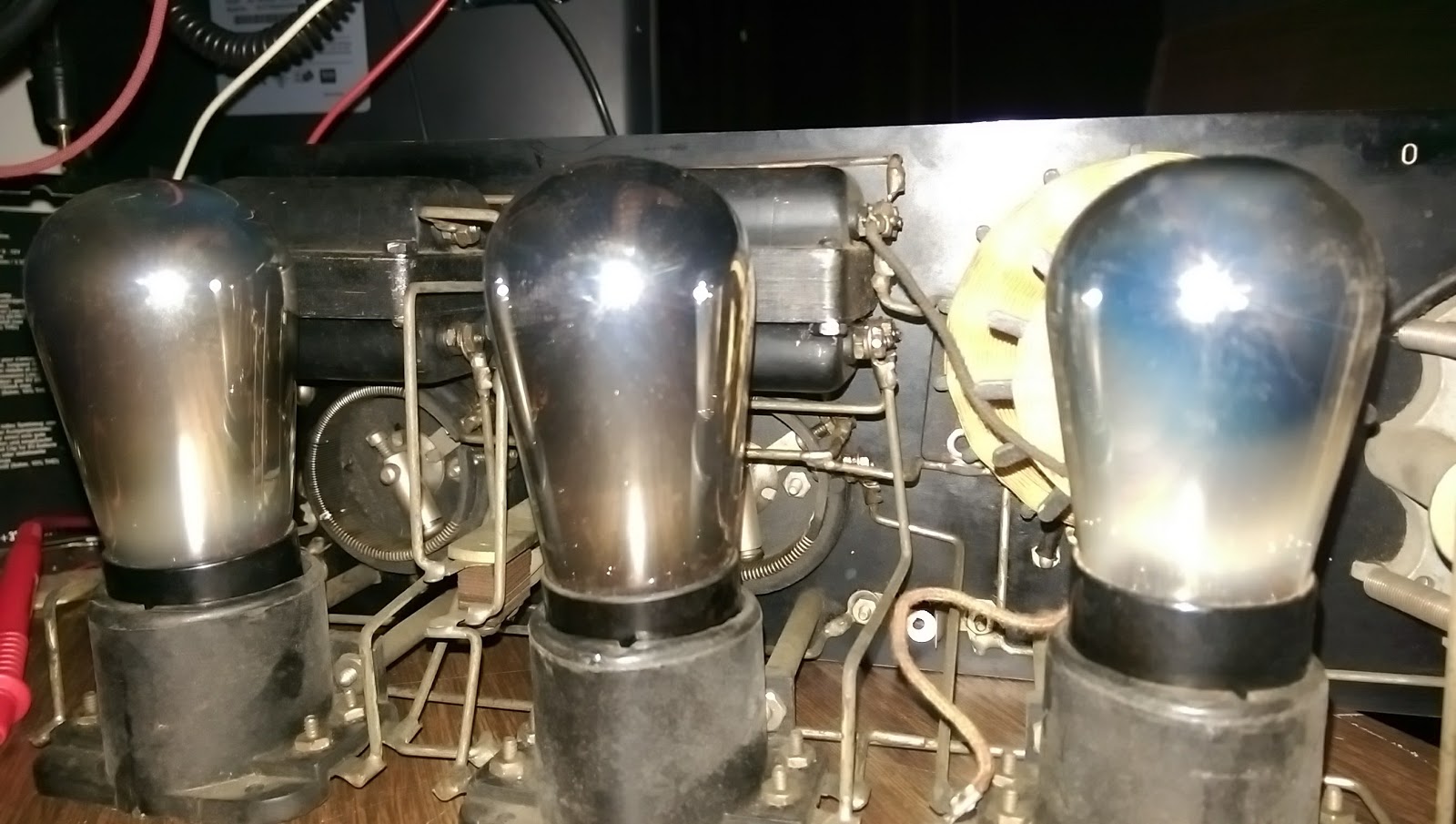
Amateur Radio - 1924 Crosley 52

This beauty was found at our club swapmeet.  It is a nearly complete radio.  The power switch was missing along with a few of the knurled screws.  The case is in nice shape too.  I brought it home for nearly market value and discovered that the tubes were also good.


The schematic revealed that the Crosley 52 is a basic regenerative receiver.  The first tube does all the RF work.  The second and third tubes are for audio amplification only.
https://www.radiomuseum.org/r/crosley_52.html

The grid leak resistor was also found to be open-circuit.  It is supposed to be 3 megaohm, so hiding a modern resistor under the grid leak resistor holder, was easily done to maintain proper operation.

The chassis is held rigid by the thick wiring to the tube sockets.  The cloth-covered wire of the tickler coil is all intact.


After the dirt was cleaned away from the chassis, and the tube sockets cleaned, all the filaments did not glow.  I had to solder a short between two of the windings on the filament rheostat.


All the wiring was intact.  This radio was probably forgotten on a shelf somewhere for many years and not abused.  The front of the radio was easily cleaned from years of dirt.

Replacement of the power switch was going to be a difficult matter.  The switch operates by pulling the stem out.  I found a piece of brass rod, put it in the lathe and turned it down.  A plastic sleeve fits over the stem, and a steel ring makes the contact.  The rear of the stem is drilled and tapped for a screw, which holds on a washer keeping the whole assembly from popping out of the front.  Only an expert is going to spot that it isn't original.  The point is that it works and I haven't done any modification that isn't reversible if I do locate an original switch assembly.


This radio was intended to run from batteries, but since Burgess has long been out of business, there's no ready source of period-correct batteries.  I want to run it off the mains anyway, so I need to build a power supply.  The power supply has to produce +5vdc for the filaments and +45vdc and +22vdc for the tubes.  Normally this would be done with 4 No. 6 dry cells and a B+ battery like the 10308.  I felt that No. 6 dry cells were pretty big, so I started looking for alternatives like a 2FBP dry cell.  Searching the internet for resources led to a page to which someone has kindly scanned in a set of battery boxes from these old dry cells.  BINGO!  However the scans weren't good enough quality to simply print out.  I spent basically a whole day re-creating the artwork for these Burgess dry cells in Inkscape vector drawing software.  The results a reasonably good.  The cells look good sitting on the shelf next to the Crosley radio.

Arts and Crafts
Filling the mockup dry cell with a block of wood and instant concrete yields a reasonable weight.


All that was missing was a speaker.  There were plenty of Atwater-Kent speakers to choose from, but I felt that a reasonable Crosley speaker would be the only acceptable solution.  The swap meets didn't yield any results, so on ebay I was able to find a good working example of a Dynacone Type F.  This has a field coil that can be powered up by the A+ supply.  I wasn't able to get exact specs, so using only 5 volts with a 500 ohm coil seemed a good limitation.  If someone can find better ratings for this field coil, I would be happy to know.  I tested the speaker using a LM385 amplifer driving into an impedance matching transformer.  It worked, but sounded terribly over-driven.  I hoped that driving it from a tube would yield better results.  Otherwise it would mean tearing the speaker down for an overhaul.


The last step was to make a power supply battery eliminator.  This will be built into a mockup 10308 Burgess battery.  Testing the radio for the first time the power supply was just built as a breadboard circuit.  The transformer puts out 190 volts center-tapped at 25 mA.  Using 22 volt zener diodes each step of voltage is available to power this radio.


The audio wasn't particularly strong, and I believe the power supply needs a larger filter capacitor to clean up the hum.

With the radio chassis sorted, the battery eliminator case needed designed.  This housing was to be a Burgess 10308 B+ battery.  This battery is quite large and will easily house the entire power supply.  An additional connector will be used for the filament voltage and hidden out of view near the 120vac cord.  I decided to make the box out of acrylic glass and finally adhere the artwork to it when everything is finished.  The scanned artwork wasn't clear enough for my liking, so I re-drew the whole thing in Inkscape for a crisp clear final product.

Attaching the artwork was done with some 3M "Super 77" spray contact cement.  The acrylic glass was first scuffed with a Scotchbrite pad so the adhesive would stick better.  The result is a nice battery box.
"Recognized by their stripes; Remembered by their service."

The circuit board and transformer was affixed to a wooden block.  The rear of the box has to allow the cord to leave through a hole in the bottom, and I decided to put a lighted power switch in it.


The fahnestock clips were installed and another test was done to insure all was right.

All was not right, however, and the speaker had to be stripped down for some adjustment and cleaning.  I ended up taking the whole thing apart and cleaning it out.  The adjustment screw needed lubricated anyway.  After that was done the volume could be adjusted much louder.


The whole setup was moved to the shack and re-assembled on a shelf for display and use.  I need to obtain some cloth-covered wire for aesthetics.  That concludes the overhaul and restoration of this fine surviving specimen.


Saturday, October 7, 2017

Amateur Radio - IC-207H 2m power module repair

The Icom IC-207H is a nice radio.  I was fortunate enough to obtain one from a friend.  It was used hard and its beginning to show.  However, as a mobile rig goes, its a small tough package.  The problem is that I've begun receiving reports that my signal is breaking up when the radio gets hot.

A fellow ham also has a IC-207H and recommended to inspect the SC-1091 VHF power module.  Apparently this module has a ceramic substrate and will form cracks due to uneven heating.  He recommended bridging the cracks with solder and a thin wire.

Since the IC-207H dual band mobile is a fairly simple rig, disassembly is easy.  First remove the head unit and the screws that hold the head connector on the main unit.  Remove the four bottom case screws and then remove all the screws from the main board and the two retaining screws from the power modules.  Unsolder the antenna connector and slip the board out.


The 2 meter power module is the one with fewer wires coming out of it.  (The 70cm module is actually sealed and you can't get into it anyway.)  Unsolder the 2 meter power module and GENTLY pry the black cover off.  Its on there pretty good, so just work it off a little at a time.  Don't break the ceramic substrate.  Once the cover is off inspect the ceramic for hairline cracks.  Use a soldering iron with HIGH heat >40w and bridge any gaps in the traces with some light wire and good solder.  The module dissipates heat quickly, don't use too much solder or you'll just have a blob.

You can see the hairline crack on this module and then how it was repaired.  You have to look really hard to see the crack.  Its in the center of the board.


Forgive the globbly solder, its on there good, but its hard to get it hot enough to melt uniformly.  I didn't want to make it worse by overheating the ceramic in one spot with the soldering iron.


When re-assembling grind the little clip areas off the inside of the 2 meter power module cover.  This will reduce the stress on the ceramic during re-assembly.  After this repair procedure the radio works great.


Saturday, May 27, 2017

Amateur Radio - Icom IC-746 meters go full scale

There is some documentation floating around concerning the failure with the Icom IC-746 and self oscillation on the 6 meter band.  The suggestion is that the radio begins to receive itself through coupling of the open contacts of the TX/RX relay.  When this happens the radio goes out of control, with all the meters going full scale.  The power output is real, but there is no audio.  It started during the January VHF contest and got consistently worse.

I replaced Q25 and D22, but that didn't solve the problem.  I also saw that my radio had the factory mod for the PIN diodes around IC151.  They were found to be ok, but replaced anyway.


I found a page on the same problem on a IC-756PRO, that looked like it would solve my problem, but it needed adaptation to the 746.
http://www.hampedia.net/icom/ic-756proii-oscillation-problem.php

The concept of the "crowbar" relay to ground the RX line during transmit seemed the right thing to do.  There was also plenty of space to install the relay.  I chose a very small 12v relay that could mount right above the L28 inductor.  I removed some of the green surface of the ground plane of the board with a diamond bit engraving tool to expose pure copper of the board.  This allowed me to solder the relay's contact leads directly to the surface of the board.  The other side of the NO contact went to the trace that joined L28.

The coil wires of the Crowbar relay were run external to the board over the edge and to the same points as RL4.


The installation is clean and the radio works great now!  Full power restored to 6 meter band and the autotuner now works again.


Control Board from the bottom showing the Crowbar relay coil wires.

Postlogue: 
The crowbar modification was working well for almost 10 months.  Then something in the setup changed which stopped it from working.  The Receive Antenna Relay Box modification plugged into the ACC2 port seems to draw enough current from the trigger line that it stops the crowbar relay from working.  When the plug was removed from the ACC2 port, the crowbar relay started working again.  Make sure the main power supply voltage is at specification as not to produce a brown-out condition on these modifications. 

Sunday, March 19, 2017

Amateur Radio - Monitor Crystaliner

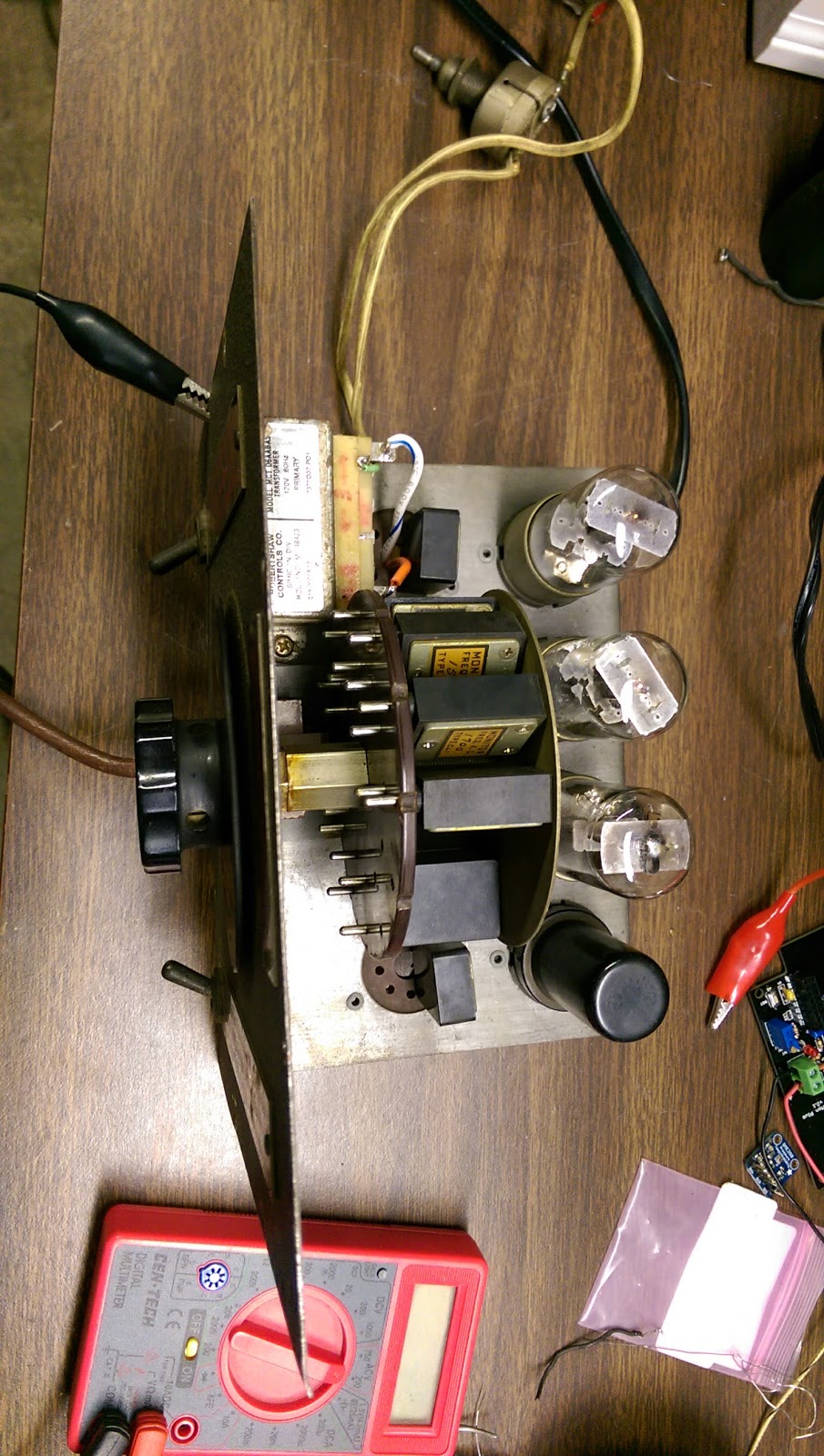
I've had this 1948 Monitor Crystaliner for a long time.  I've always been wary of it since it was designed with a resistance cord.  The resistance cord (or curtain burner as it is called) has a piece of nichrome wire wound around the hot lead to drop about 100 volts so that the 4 filaments of the 6J5 tubes can be powered in series.  Of course the cord was damaged and was no longer safe.  The man that I got it from just put a rubber tube over the whole cord.  I imagine he used it that way, but I wasn't that daring.

It is a relatively crude instrument but in its way a rather elegant design.


Today I decided to make it operate.  The main filter capacitors had to be replaced.  They were both faulty.  The hard part was replacing the resistance cord with a filament transformer.  I reasoned that the 6J5 tubes would work just as well on 6 volts as on 6.3 volt filament voltage.  There is just enough room to put a transformer on the top part of the chassis.

It was a nice little project for an afternoon.  The Monitor Crystaliner is designed to produce harmonics from its crystals as well as fundamental frequencies.  The original instructions were something I had, but I had to research the schematic.